Select Version of EA Desktop:
The Catalog module includes a variety of features and functions for cataloging your products and linking them to the associated records in Exploration Archives. The main tasks are to add files and media, enter metadata, catalog the detail and link the items to seismic.
These instructions are relevant to the New Item Catalog type of catalog session. However, the Remediation Catalog type has the same features and layout.
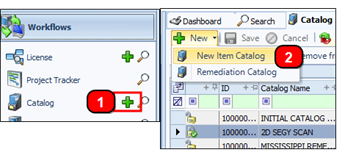
You can create a new catalog session 2 ways:
-
On the Navigation panel: Click Add beside the Catalog module
-
From the toolbar: Click New, then select New Item Catalog from the list.
The Catalog module opens in the edit mode.
The information bar includes the following fields:

-
ID: The ID is auto-populated.
-
Catalog Name: This is a required field.
-
Project ID: If needed, select the Project ID from the drop-down list.
-
Lock icon: indicates if the session is locked.
-
Catalog Status: When creating a new session, this normally displays as CREATED.
In the Details panel, fill out the following fields:

-
Assigned Associate and Assigned User: Select these from their respective drop-down list.
-
Comment: You can enter the comment directly in the field, or click the pin to open the edit window and enter a comment.
-
Staging Folder: Click the browse icon and navigate to the location of the staging folder.
-
Cost Group: Select the Cost Group in accordance with your company procedures.
-
The last 3 fields: Initial Estimated Cost, Rolling Estimated Cost, and Actual Cost.
The Catalog module includes a variety of features and functions for cataloging your products and linking them to the associated records in Exploration Archives. The main tasks are to add files and media, enter metadata, catalog the detail and link the items to seismic.
These instructions are relevant to the New Item Catalog type of catalog session. However, the Remediation Catalog type has the same features and layout.
You can create a new catalog session 2 ways:
-
On the Navigation panel: Click Add beside the Catalog module
-
From the toolbar: Click New, then select New Item Catalog from the list.
The Catalog module opens in the edit mode.
The information bar includes the following fields:
-
ID: The ID is auto-populated.
-
Catalog Name: This is a required field.
-
Project ID: If needed, select the Project ID from the drop-down list.
-
Lock icon: indicates if the session is locked.
-
Catalog Status: When creating a new session, this normally displays as CREATED.
In the Details panel, fill out the following fields:
-
Assigned Associate and Assigned User: Select these from their respective drop-down list.
-
Comment: You can enter the comment directly in the field, or click the pin to open the edit window and enter a comment.
-
Staging Folder: Click the browse icon and navigate to the location of the staging folder.
-
Cost Group: Select the Cost Group in accordance with your company procedures.
-
The last 3 fields: Initial Estimated Cost, Rolling Estimated Cost, and Actual Cost.